 Sashimii
Voice Cleanup
Clean up background noise and room echo in your voice, preview the result against the original, and choose how much to apply.
Voice cleanup reduces background noise and room echo in the recording, on your Mac. It is on for new projects, at Amount 75%, unless you untick Clean up voice at setup. The transcript and the waveform always use the original sound.
Open it with Audio in the toolbar, or Cut › Voice Cleanup… (⌥ ⌘ V). The Audio icon shows whether cleanup is on.
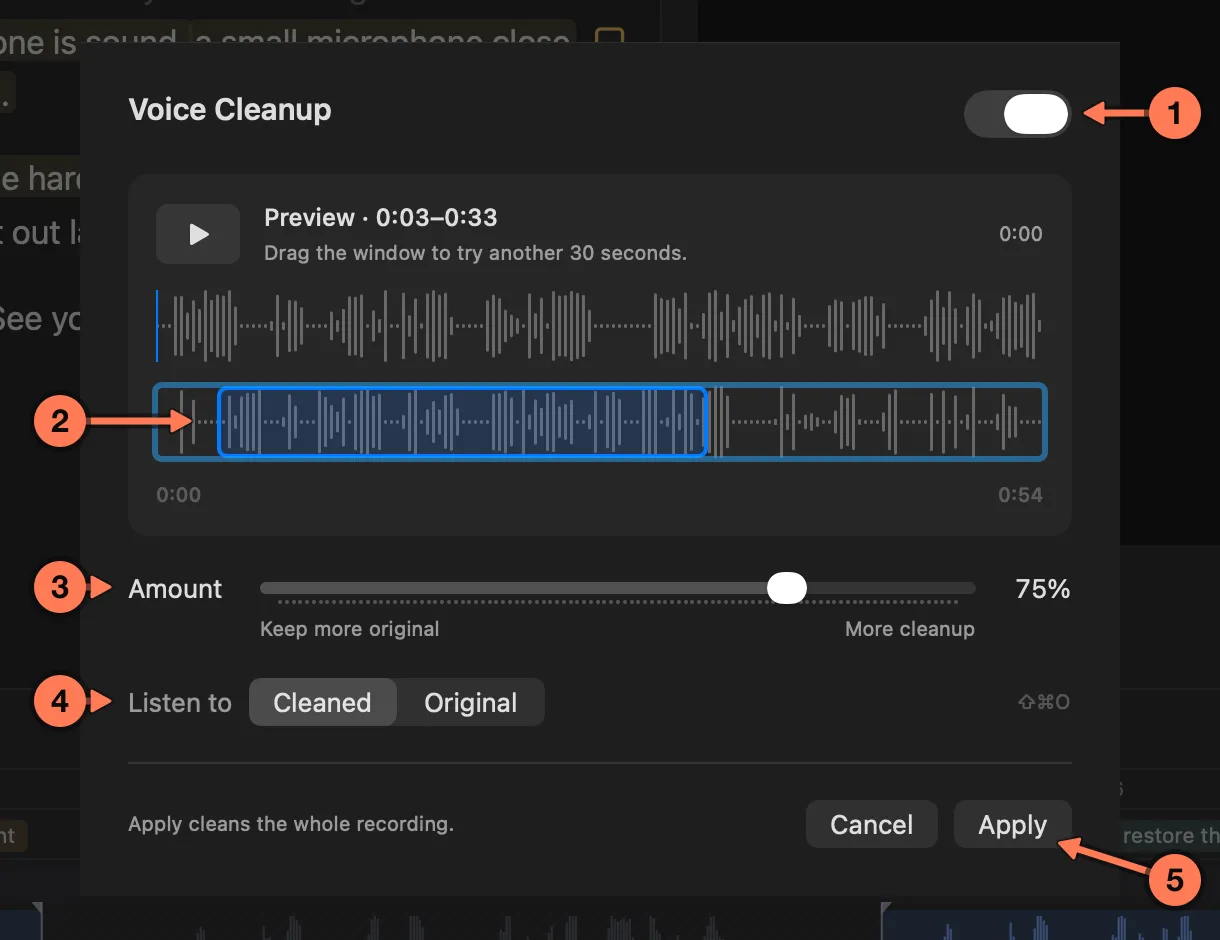
- On or off for the whole project.
- The preview window: 30 seconds of speech. Drag it along the recording to try another passage.
- Amount: lower keeps more of the original sound, higher cleans more.
- Listen to Cleaned or Original, to compare (⇧ ⌘ O).
- Apply cleans the whole recording at that Amount.
Outside the sheet, Cut › Listen to Original (⇧ ⌘ O) flips the main preview between the cleaned and the original sound.
A rendered video uses the cleaned voice when cleanup is on. An export to DaVinci Resolve always uses the original recording, so you can do your own sound work there.