 Sashimii
Setting Up a Project
Turn a folder holding your recording into a Sashimii project, with a separate recorder file, a Style and voice cleanup if you want them.
A Sashimii project starts from a folder: the one that holds your recording. Choose File › New Project from Folder… (⌘ N) and pick it.
What the Folder Can Hold
- One video, and at most one separate audio file, such as a WAV from an external recorder. This makes a video project.
- One audio file and no video (WAV, AIFF, M4A, MP3, CAF or FLAC). This makes an audio project, for a podcast, a lesson or a voiceover. See Audio Projects and Voiceover Videos.
If the folder holds several videos or several audio files, Sashimii asks which ones to use. A folder with no video or audio, or one that already has a project in it, is refused with a message saying why, and nothing is written.
The New Project Screen
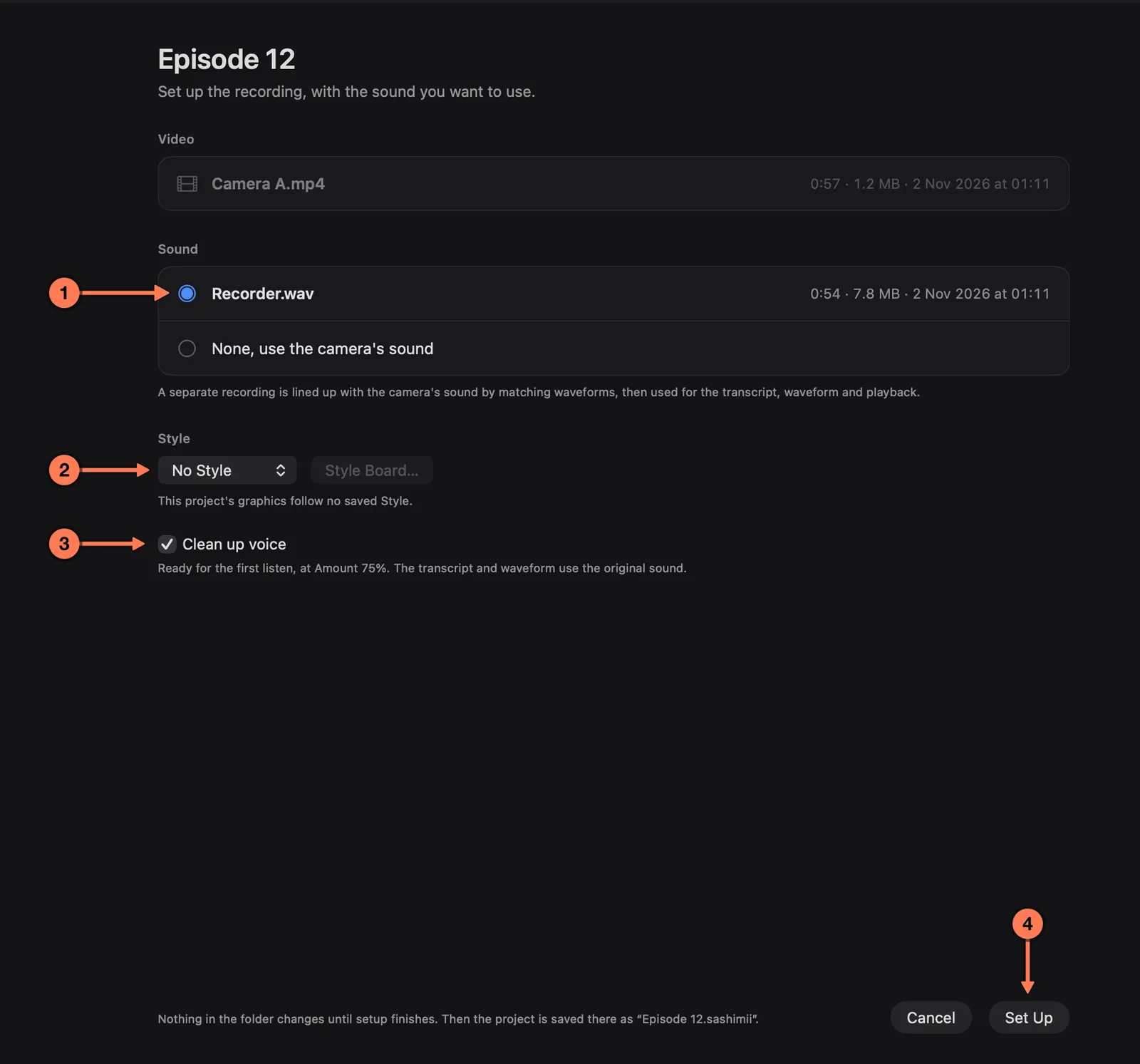
- Sound. Choose the separate recording, or None, use the camera’s sound.
- Style. The look your graphics follow. No Style is fine for a first cut; see Styles.
- Clean up voice. On by default.
- Set Up starts setup. Nothing is written until you press it.
What Setup Does
Setup shows each step as it runs:
- Media. It reads the video’s frame rate and length.
- Audio sync, when you chose a separate recording. Sashimii lines it up with the camera’s sound by matching their waveforms, and checks the match at the start, middle and end. From then on the separate recording is the project’s sound: transcript, waveform and playback. If the file doesn’t match the video, or drifts out of sync, setup stops and says so. It never guesses the offset. Choose the camera’s sound instead, or move the file out of the folder.
- Transcription, on your Mac. Words appear as each chunk finishes.
- Waveform. One audio level for every frame.
- Missed speech. Where the waveform hears speech that no word covers, that stretch is transcribed again on its own.
- Voice cleanup, unless you turned it off. The transcript and waveform still use the original sound. If cleanup fails, setup still finishes with the original sound and tells you why.
The project is built in a temporary folder and moved into place when every step is done, so a cancelled or failed setup leaves your folder as it was. The finished project sits beside your recording as <folder name>.sashimii. Finder shows it as one file; double-click it to open it.
There is no AI step in setup. When it finishes, it shows Project ready and the request to give your agent. Next: Drafting with Your Agent.
Your Recording Is Never Changed
A project points at your recording; it doesn’t copy, move or re-encode it. Sashimii saves every change to the project within half a second and keeps the last 100 versions of each project file in the project’s cache/history/ folder.