 Sashimii
Reviewing Joins
Step through every join in the cut at frame zoom, listen across it, fix its edges and accept it.
A join is where two kept clips meet. Join review steps through every join in order, so you can hear each one and fix it before you export. Press R or ⌘ J, or click Review in the toolbar. While it runs, the toolbar shows how far through you are, such as Reviewing 3/9.
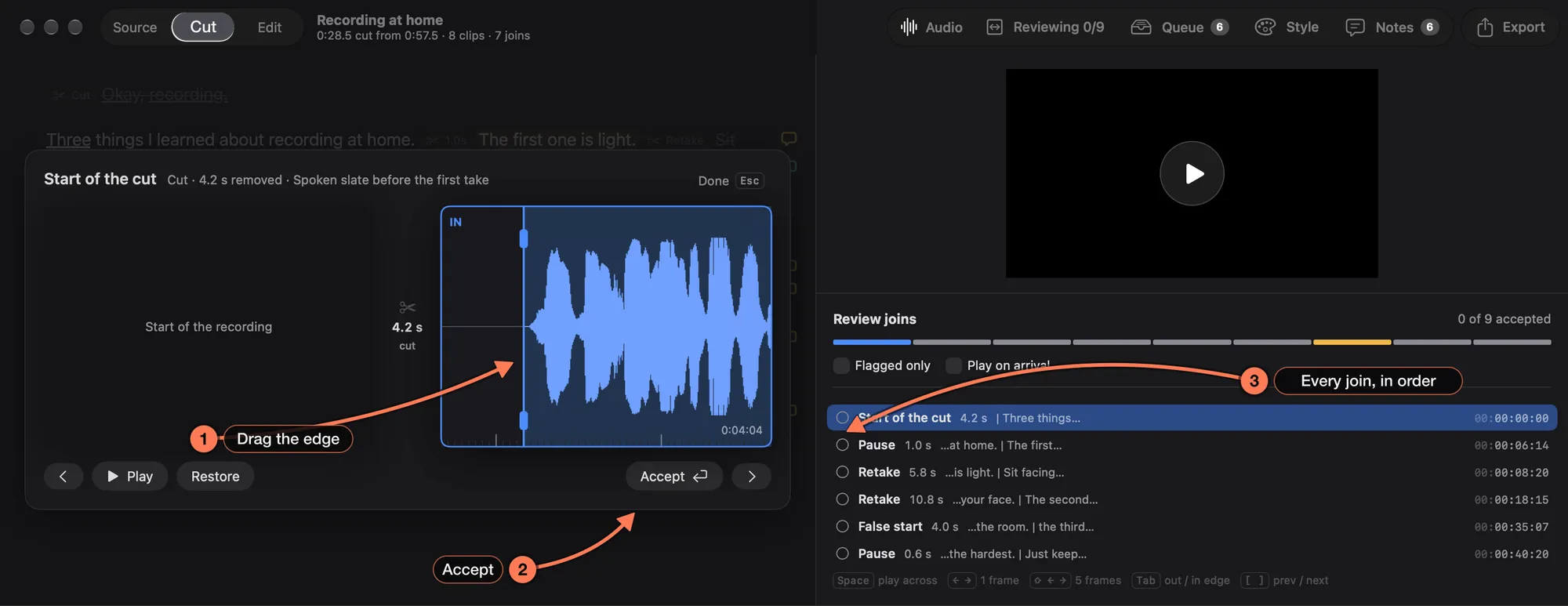
- The join at frame zoom. The out side (the end of the clip before the join) and the in side (the start of the clip after it), side by side. The line on each waveform is its edge.
- Accept marks the join as right and moves to the next one.
- Every join, in order, with what was cut there (Retake, Pause, False start) and how long. The count at the top shows how many you have accepted.
Fix a Join
- Drag a side’s waveform to slide the clip. The waveform follows the pointer, so dragging right moves the edge earlier.
- Drag the edge line itself.
- Nudge the active edge with ← →: one frame, or five with Shift. Tab switches between the out and in side.
The join replays after each change. Restore brings back what was cut there.
Keys
| Key | What it does |
|---|---|
| Space | Play across the join |
| ← → | Nudge the active edge a frame (Shift: five) |
| Tab | Switch between the out and in side |
| Return | Accept and move to the next join |
| [ ] | Previous and next join |
| Esc | End review |
Flagged only limits the list to joins the edge pass flagged for you. Play on arrival plays each join as you reach it.
Kept Pauses in Review
A pause the edge pass left for you shows whole, between its out and in lines. Move either line to set how much Cut this pause would remove; the replay and Space then play that trim without making it. Accept keeps the whole pause.
From Edit View
In Edit view, every cut has a mark on the timeline. Click one (or step with [ and ]) to select its join: Play plays a second across it, and Open in Cut (or Return) opens join review on it. You can also drag the handles either side of the mark to move that clip’s edge. See Edit View and Graphics.