 Sashimii


Sashimii vs Adobe Premiere
Checked against Adobe Premiere 26.5.2
Verdict
Full editorAdobe Premiere, formerly Premiere Pro, is a full video editor for Windows and Mac, with Text-Based Editing, colour, graphics, mixing and Team Projects. It costs US$22.99 a month on its own Creative Cloud plan.
- Mac · Windows
- US$22.99 a month
Rough cut firstSashimii is a Mac app for the job before all that: your own AI agent drafts the rough cut of a talking-head recording from its transcript, and you check every join to the frame.
- macOS 26 or later, Apple silicon
- Free during the beta
If you need one app to edit and finish in, use Premiere. Sashimii can do the rough cut and render the video, but it has no Premiere export, so today the two don’t hand off a timeline.
Pick Adobe Premiere if you need
- Finishing
- Text-Based Editing on any footage
- Multicam and teams
- Windows
- Built-in AI
- Handoff to other editors
- A settled product
Pick Sashimii if
- you make talking-head videos on a Mac, and you record far more than you keep.
- you already use Claude Code or Codex, or are happy to, and want it to make the first editorial pass.
- you want to hear every join before you publish, and fix it to the frame.
- your video is simple enough to render straight from Sashimii, or you finish in DaVinci Resolve.
The Job, Side by Side
- Sashimii: not this stage.01RecordAdobe Premiere: not this stage.
Shooting the video. Neither tool on these pages records it; it is the source media every later stage works on.
- Agent draftYour agent picks the takes from the transcript; Sashimii places every cut on the waveform.02Rough cutText-Based EditingCut or delete text in the sequence transcript to remove clips, or build a sequence from selected lines with Paper Edit.
- Join reviewJoin review steps through every join at frame zoom.03Fix joinsTrim modeTrim mode shows the frames either side of an edit and trims forward or back.
- Graphics from notespartlyYour agent builds on-screen text, karaoke captions and graphics from your notes, in your Style. No subtitle track.04Graphics and captionsTitles, captionsAnimated titles and graphics from templates, and captions from Speech to Text.
- Chapter listChapter notes become the m:ss list for your YouTube description.05ChaptersChapter markerspartlyChapter markers create navigation points in the finished video; the marker docs don't describe a YouTube chapter list.
- Sashimii: not this stage.06Grade and compositeColor, maskingColour wheels, curves and scopes, and AI object masking and tracking.
- MP4 or ResolveRenders an MP4, or exports separate clips on your original recording to Resolve.07ExportExport, XML, AAFExports video, and Final Cut Pro XML, AAF, EDL and OMF for other apps.
How Sashimii Is Different
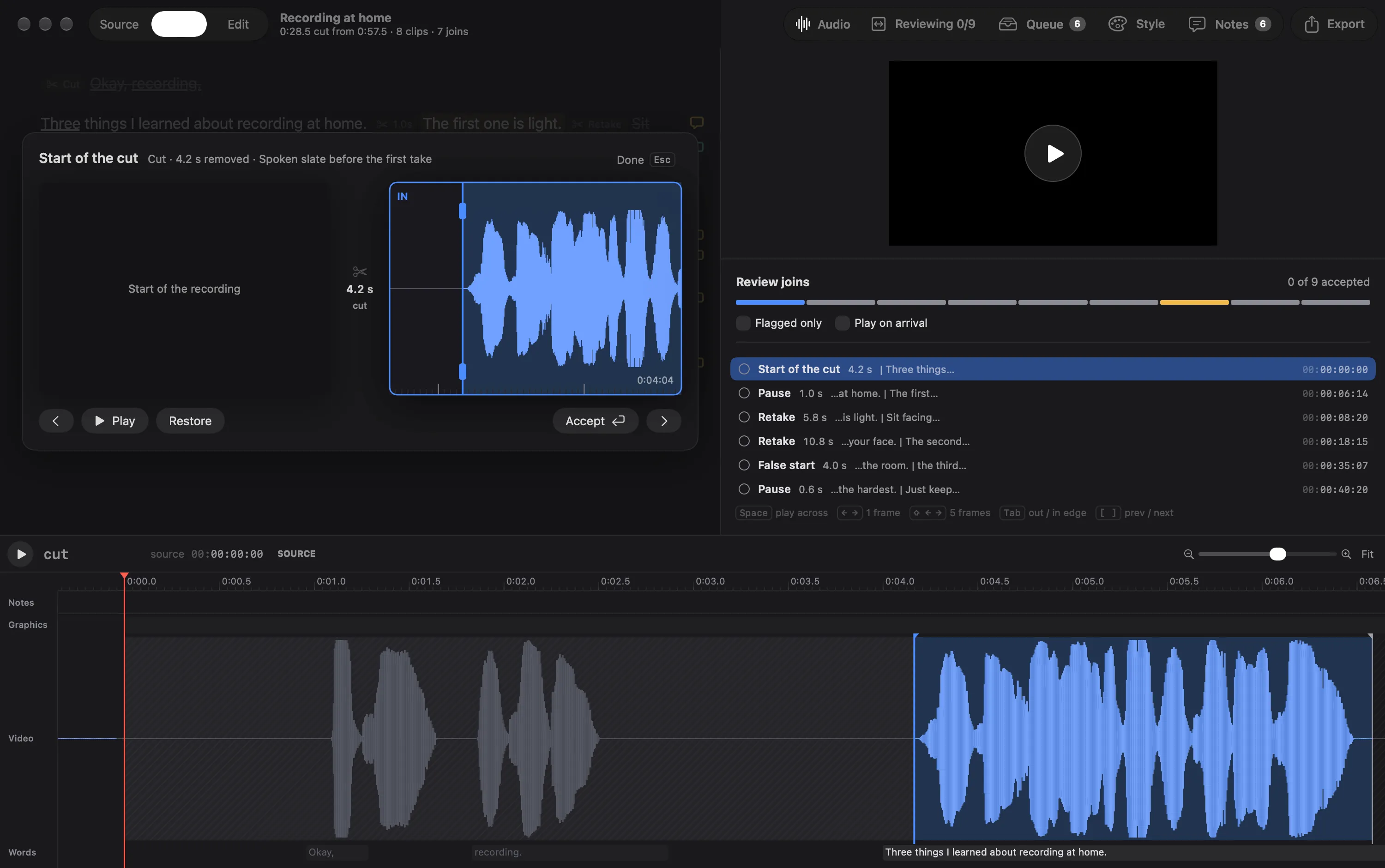
- The cut is made to be checked. Premiere’s Text-Based Editing lets you delete lines and its Pauses filter finds silences, which gets you a first cut fast. Sashimii goes one step further for talking-head work: after your agent names each cut, it moves every edge onto the waveform, flags the pauses it isn’t sure about, and steps you through every join at frame zoom until each one is accepted.
- One pass through the transcript. While you review, you leave notes on words: a zoom here, text on screen there, a chapter starting at this line. Your agent turns those notes into graphics in your Style, and the chapter notes become the list for your YouTube description.
- Your own agent, not a built-in one. Premiere’s AI Assistant, in Premiere (beta), can build stringouts and rough assemblies from a prompt, but Adobe says you can’t connect your own model to it. Sashimii is built the other way round: Claude Code or Codex, on the plan you already have, drafts the cut through Sashimii’s skill and command-line tool, on a project of plain files it can read.
Feature by Feature
| Feature | Sashimii | Adobe Premiere |
|---|---|---|
| Transcript and rough cut | ||
| Your own AI agent drafts the cut | YesClaude Code or Codex drafts the cut through the Sashimii skill and command-line tool.sashimii.app/docs/drafting-with-your-agentChecked 4 Nov 2026 · v1 beta | NoPremiere AI Assistant (beta) assembles rough edits itself, but you can't connect your own model to it.helpx.adobe.com/premiere/desktop/premiere-ai-assistant/assistant-faq.htmlChecked 4 Nov 2026 · 26.5.2 |
| A rough-cut workflow for your agent | YesThe Sashimii skill teaches your agent the drafting steps and take rules; "check Sashimii" finds the work, and the agent leaves a note on every judgement call.sashimii.app/docs/drafting-with-your-agentChecked 4 Nov 2026 · v1 beta | No dedicated toolAdobe's docs don't describe one for your own agent. The AI Assistant, in Premiere (beta), builds stringouts and rough assemblies from prompts.helpx.adobe.com/premiere/desktop/premiere-ai-assistant/overview.htmlChecked 4 Nov 2026 · 26.5.2Know of one? Tell us and we’ll fix this row |
| Cut edges placed on the waveform | YesThe edge pass moves every cut edge onto the audio and flags borderline pauses.sashimii.app/docs/cuttingChecked 4 Nov 2026 · v1 beta | No dedicated toolDeleting text in the sequence transcript removes clips with a ripple edit, but nothing places those edges on the waveform for review.helpx.adobe.com/premiere/desktop/edit-projects/edit-video-using-text-based-editing/edit-sequences-using-text-based-editing.htmlChecked 4 Nov 2026 · 26.5.2Know of one? Tell us and we’ll fix this row |
| Borderline pauses flagged for you | YesThe edge pass cuts clear pauses and flags borderline ones, such as "Pause 0.4s · cut?", for you to answer Cut or Keep.sashimii.app/docs/cuttingChecked 4 Nov 2026 · v1 beta | No dedicated toolThe transcript's Pauses filter finds pauses to delete one at a time or all at once, but nothing flags the borderline ones for review.helpx.adobe.com/premiere/desktop/edit-projects/edit-video-using-text-based-editing/detect-and-delete-pauses-in-transcripts.htmlChecked 4 Nov 2026 · 26.5.2Know of one? Tell us and we’ll fix this row |
| Join-by-join review at frame zoom | YesSteps through every join at frame zoom; play across it, nudge, accept.sashimii.app/docs/reviewing-joinsChecked 4 Nov 2026 · v1 beta | No dedicated toolTrim mode (Shift+T) shows the frames either side of one edit, but nothing steps through every join and tracks which are done.helpx.adobe.com/premiere/desktop/edit-projects/trim-clips/about-trim-mode.htmlChecked 4 Nov 2026 · 26.5.2Know of one? Tell us and we’ll fix this row |
| Transcribes speech in the app | YesParakeet speech recognition on your Mac; the model downloads once, then it runs offline.sashimii.app/docs/getting-startedChecked 4 Nov 2026 · v1 beta | YesSpeech to Text transcribes clips on import or from the Text panel, with speaker labels.helpx.adobe.com/premiere/desktop/add-text-images/insert-captions/auto-transcribe-video-using-speech-to-text.htmlChecked 4 Nov 2026 · 26.5.2 |
| Missed speech recovered | YesWhere the waveform hears speech that no word covers, that stretch is transcribed again on its own.sashimii.app/docs/projectsChecked 4 Nov 2026 · v1 beta | No dedicated toolAdobe's docs don't describe one.helpx.adobe.com/premiere/desktop/edit-projects/edit-video-using-text-based-editing/transcribe-video.htmlChecked 4 Nov 2026 · 26.5.2Know of one? Tell us and we’ll fix this row |
| Cut by editing the transcript | YesSelect words in the transcript and press Delete; the edges land on the waveform.sashimii.app/docs/cuttingChecked 4 Nov 2026 · v1 beta | YesCut or delete text in the sequence transcript to remove clips; Premiere applies a ripple edit.helpx.adobe.com/premiere/desktop/edit-projects/edit-video-using-text-based-editing/edit-sequences-using-text-based-editing.htmlChecked 4 Nov 2026 · 26.5.2 |
| Frame-accurate trimming | YesArrow keys nudge the active edge one frame, Shift five.sashimii.app/docs/reviewing-joinsChecked 4 Nov 2026 · v1 beta | YesTrim mode trims an edit forward or back, one frame or five at a time.helpx.adobe.com/premiere/desktop/edit-projects/trim-clips/about-trim-mode.htmlChecked 4 Nov 2026 · 26.5.2 |
| Separate recorder synced by waveform | YesA recorder's WAV is lined up with the camera sound by waveform, with the match checked at the start, middle and end.sashimii.app/docs/projectsChecked 4 Nov 2026 · v1 beta | YesClip > Synchronize can use an audio track as the reference to line up separately recorded clips.helpx.adobe.com/premiere/desktop/add-audio-effects/basic-audio-editing/synchronize-clips-in-the-timeline-panel.htmlChecked 4 Nov 2026 · 26.5.2 |
| Build a timeline from a script | NoSashimii cuts one recording from its transcript; it doesn't match a script to clips.sashimii.app/docs/projectsChecked 4 Nov 2026 · v1 beta | No dedicated toolPaper Edit builds a sequence from lines you select in the transcript, not from a written script.helpx.adobe.com/premiere/desktop/edit-projects/edit-video-using-text-based-editing/create-a-sequence-with-paper-edit.htmlChecked 4 Nov 2026 · 26.5.2Know of one? Tell us and we’ll fix this row |
| Graphics, chapters and sound | ||
| Notes on words become graphics and chapters | YesSelect words, press N and tag the note (Text on screen, Zoom, B-roll, Chapter and more); your agent builds the graphics in your Style, and Chapter notes become chapters.sashimii.app/docs/notesChecked 4 Nov 2026 · v1 beta | No dedicated toolComment markers hold notes and chapter markers mark chapters, but nothing turns a note into a graphic.helpx.adobe.com/premiere/desktop/organize-media/apply-labeling/overview-of-markers.htmlChecked 4 Nov 2026 · 26.5.2Know of one? Tell us and we’ll fix this row |
| YouTube chapters | YesCopy YouTube Chapters copies one m:ss line per chapter, with 0:00 added when needed.sashimii.app/docs/chaptersChecked 4 Nov 2026 · v1 beta | PartlyChapter markers create navigation points in the finished video; Adobe's marker docs don't describe a YouTube chapter list.helpx.adobe.com/premiere/desktop/organize-media/apply-labeling/overview-of-markers.htmlChecked 4 Nov 2026 · 26.5.2 |
| Voice cleanup | YesReduces noise and room echo on your Mac, with Listen to Cleaned or Original to compare.sashimii.app/docs/voice-cleanupChecked 4 Nov 2026 · v1 beta | YesEnhance Speech reduces background noise, with a Mix Amount slider to balance the enhanced and original audio.helpx.adobe.com/premiere/desktop/add-audio-effects/adjust-volume-and-levels/enhance-speech.htmlChecked 4 Nov 2026 · 26.5.2 |
| Subtitles from speech | NoKaraoke captions can be made as graphics from a note; there is no subtitle track or file.sashimii.app/docs/notesChecked 4 Nov 2026 · v1 beta | YesCaptions from Speech to Text, exported burned in, embedded or as sidecar files.helpx.adobe.com/premiere/desktop/render-and-export/export-files/export-caption-tracks.htmlChecked 4 Nov 2026 · 26.5.2 |
| Finishing suite | ||
| At a glance | Partly, 2 of 6Colour gradingCompositing and VFXMotion graphicsAudio postMulticamTeams on one project | All 6Colour gradingCompositing and VFXMotion graphicsAudio postMulticamTeams on one project |
| Colour grading | NoNo colour tools. Export to Resolve to grade.sashimii.app/docs/exportingChecked 4 Nov 2026 · v1 beta | YesColour wheels, curves and built-in video scopes, with AI colour balancing.adobe.com/products/premiere.htmlChecked 4 Nov 2026 · 26.5.2 |
| Compositing and VFX | NoOnly the graphics your agent makes.sashimii.app/docs/edit-view-and-graphicsChecked 4 Nov 2026 · v1 beta | YesAI object masking and tracking, and effects with keyframes; After Effects is a separate app.adobe.com/products/premiere.htmlChecked 4 Nov 2026 · 26.5.2 |
| Motion graphics | PartlyYour agent writes the graphics from your notes, in your Style; you move, retime and approve them. No graphics editor of its own.sashimii.app/docs/edit-view-and-graphicsChecked 4 Nov 2026 · v1 beta | YesAnimated titles, captions and graphics from templates, customised inside Premiere.adobe.com/products/premiere.htmlChecked 4 Nov 2026 · 26.5.2 |
| Audio post | PartlyVoice cleanup, and loudness matched to YouTube's −14 LUFS on render. No mixer.sashimii.app/docs/exportingChecked 4 Nov 2026 · v1 beta | YesMixing, noise reduction, dialogue enhancement and advanced effects.adobe.com/products/premiere.htmlChecked 4 Nov 2026 · 26.5.2 |
| Multicam | NoOne video per project, with at most one separate audio recording.sashimii.app/docs/projectsChecked 4 Nov 2026 · v1 beta | YesMulti-camera sequences, with clips marked for synchronization.helpx.adobe.com/premiere/desktop/edit-projects/set-up-multi-camera-sequences-for-editing/mark-clips-for-synchronization.htmlChecked 4 Nov 2026 · 26.5.2 |
| Teams on one project | NoA project is a folder of files on your Mac. No accounts or shared projects.sashimii.app/docs/projectsChecked 4 Nov 2026 · v1 beta | YesTeam Projects: several editors in one project hosted in the cloud.helpx.adobe.com/premiere/desktop/collaborate-with-others/collaborate-using-team-projects/about-team-projects.htmlChecked 4 Nov 2026 · 26.5.2 |
| AI and agents | ||
| AI features built into the app | PartlySpeech recognition and voice cleanup, both on your Mac. The editorial calls come from your own agent, not a built-in model.sashimii.app/docs/drafting-with-your-agentChecked 4 Nov 2026 · v1 beta | YesGenerative Extend (Firefly, needs internet), Media Intelligence search, Enhance Speech, object masking and the Generative Media Tool.helpx.adobe.com/premiere/desktop/whats-new/whats-new.htmlChecked 4 Nov 2026 · 26.5.2 |
| Agent connection over MCP | YesA command-line step: `sashimii register` adds Sashimii's MCP server to Claude Code or Codex. There's no in-app connect flow, and the skill works without it.sashimii.app/docs/drafting-with-your-agentChecked 4 Nov 2026 · v1 beta | No dedicated toolAdobe's docs describe no MCP server or way to connect your own agent; the AI Assistant FAQ says you can't connect your own model.helpx.adobe.com/premiere/desktop/premiere-ai-assistant/assistant-faq.htmlChecked 4 Nov 2026 · 26.5.2Know of one? Tell us and we’ll fix this row |
| Scripting interface | YesThe sashimii command-line tool and a project of plain JSON files agents can edit.sashimii.app/docs/for-agentsChecked 4 Nov 2026 · v1 beta | YesThe UXP API, a JavaScript platform for plugins that reach many Premiere functions.developer.adobe.com/premiere-pro/uxpChecked 4 Nov 2026 · 26.5.2 |
| Export and handoff | ||
| Renders the finished video | YesMP4 in HEVC 10-bit or H.264, with its graphics.sashimii.app/docs/exportingChecked 4 Nov 2026 · v1 beta | YesExports finished video in many formats, or through Adobe Media Encoder.helpx.adobe.com/premiere/desktop/render-and-export/export-files/export-options-in-premiere.htmlChecked 4 Nov 2026 · 26.5.2 |
| Exports an editable timeline | PartlyDaVinci Resolve only (FCPXML 1.13, tested with Resolve 21.1.1). No Final Cut or Premiere export.sashimii.app/docs/exportingChecked 4 Nov 2026 · v1 beta | YesExports Final Cut Pro XML, AAF, EDL and OMF. It doesn't import .fcpxml directly; Adobe points to the XtoCC converter.helpx.adobe.com/premiere/desktop/organize-media/import-files/migrate-from-final-cut-pro-x.htmlChecked 4 Nov 2026 · 26.5.2 |
| Platforms | ||
| At a glance | 1 of 3MacWindowsLinux | 2 of 3MacWindowsLinux |
| Mac | YesA native Mac app.sashimii.app/docs/getting-startedChecked 4 Nov 2026 · v1 beta | YesOn Mac, with Apple silicon or Intel.helpx.adobe.com/premiere/desktop/get-started/technical-requirements/adobe-premiere-pro-technical-requirements.htmlChecked 4 Nov 2026 · 26.5.2 |
| Windows | NoMac only.sashimii.app/docs/getting-startedChecked 4 Nov 2026 · v1 beta | YesWindows 11 v24H2 or later, including Windows on Arm.helpx.adobe.com/premiere/desktop/get-started/technical-requirements/adobe-premiere-pro-technical-requirements.htmlChecked 4 Nov 2026 · 26.5.2 |
| Linux | NoMac only.sashimii.app/docs/getting-startedChecked 4 Nov 2026 · v1 beta | NoThe system requirements list Windows and macOS only.helpx.adobe.com/premiere/desktop/get-started/technical-requirements/adobe-premiere-pro-technical-requirements.htmlChecked 4 Nov 2026 · 26.5.2 |
| Requirements and price | ||
| Mac requirement | macOS 26 or later, Apple siliconAbout 1 GB of disk for the speech model, downloaded once.sashimii.app/docs/getting-startedChecked 4 Nov 2026 · v1 beta | macOS Sonoma (14) or laterIntel 8th generation or newer with AVX2, or Apple silicon.helpx.adobe.com/premiere/desktop/get-started/technical-requirements/adobe-premiere-pro-technical-requirements.htmlChecked 4 Nov 2026 · 26.5.2 |
| Release | BetaA free beta; testers are invited in small groups.sashimii.app/betaChecked 4 Nov 2026 · v1 beta | Public release, 26.5.226.5 came out in September 2026; 26.5.2 is the latest update. The AI Assistant is only in Premiere (beta).helpx.adobe.com/premiere/desktop/whats-new/release-notes.htmlChecked 4 Nov 2026 · 26.5.2 |
| Pricing | Free during the betaThe price after the beta isn't set yet.sashimii.app/betaChecked 4 Nov 2026 · v1 beta | US$22.99 a monthThe Premiere plan, annual billed monthly, with a 7-day trial; also in Creative Cloud Pro.adobe.com/products/premiere/plans.htmlChecked 4 Nov 2026 · 26.5.2 |
| What the AI costs | Your own agent's planDrafting runs on the Claude Code or Codex plan you already have, which may cost money. Transcription runs on your Mac.sashimii.app/docs/drafting-with-your-agentChecked 4 Nov 2026 · v1 beta | Generative creditsThe Premiere plan includes 25 generative credits a month (Creative Cloud Pro: 4,000). The AI Assistant beta has its own daily credits.adobe.com/products/premiere/plans.htmlChecked 4 Nov 2026 · 26.5.2 |
Where Adobe Premiere Is Better
Premiere is a complete editor and Sashimii isn’t. If your video needs any of this, Premiere (or another full editor) is the tool:
- Finishing. Colour wheels, curves and scopes, AI object masking and tracking, animated titles and graphics, and a full audio mix. Sashimii has none of these; its graphics are ones your agent writes from your notes.
- Text-Based Editing on any footage. Cut, copy and paste text to edit the sequence, or assemble a sequence from transcript selections with Paper Edit, across many clips and speakers. A Sashimii project is one recording.
- Multicam and teams. Multi-camera sequences, and Team Projects for several editors in one cloud project. Sashimii projects live on one Mac.
- Windows. Premiere runs on Windows and Mac. Sashimii is Mac only, macOS 26 or later.
- Built-in AI. Generative Extend, Media Intelligence search, Enhance Speech, the Generative Media Tool and, in the beta, the AI Assistant. Sashimii’s built-in processing stops at speech recognition and voice cleanup, both on your Mac; the editorial calls come from your own agent.
- Handoff to other editors. Premiere exports Final Cut Pro XML, AAF, EDL and OMF. Sashimii exports only to DaVinci Resolve.
- A settled product. Premiere 26.5.2 is a public release with a published price. Sashimii is a beta, and its price isn’t set yet.
Who Sashimii Is For, and Who It Isn’t
Sashimii is for you if:
- You make talking-head videos on a Mac, and you record far more than you keep.
- You already use Claude Code or Codex, or are happy to, and want it to make the first editorial pass.
- You want to hear every join before you publish, and fix it to the frame.
- Your video is simple enough to render straight from Sashimii, or you finish in DaVinci Resolve.
It isn’t for you if:
- You finish in Premiere and need the timeline there. Sashimii has no Premiere export.
- You edit on Windows, or with a team in shared projects.
- You want one app for grading, graphics, multicam and the mix.
- You don’t want an AI agent involved. Sashimii can cut from the transcript by hand, but its point is the agent’s draft.
Using Them Together
There’s no tested way to move a Sashimii cut into Premiere as an editable timeline. Sashimii’s only editor export is for DaVinci Resolve, an FCPXML bundle, and Adobe’s docs say Premiere doesn’t import .fcpxml directly: they point to the XtoCC converter. That route hasn’t been tried with Sashimii’s export, so this page doesn’t claim it works.
What you can do today is render the finished cut in Sashimii as an MP4, with its graphics, and bring that file into Premiere to add to it. The cuts are baked into the file, so changing them means going back to Sashimii. See Exporting for what Sashimii renders.
Pricing
Sashimii
- Price
- Free during the betaThe price after the beta isn't set yet.Source, checked 4 Nov 2026
- AI
- Your own agent's planDrafting runs on the Claude Code or Codex plan you already have, which may cost money. Transcription runs on your Mac.Source, checked 4 Nov 2026
- Status
- BetaA free beta; testers are invited in small groups.Source, checked 4 Nov 2026
Adobe Premiere
- Price
- US$22.99 a monthThe Premiere plan, annual billed monthly, with a 7-day trial; also in Creative Cloud Pro.Source, checked 4 Nov 2026
- AI
- Generative creditsThe Premiere plan includes 25 generative credits a month (Creative Cloud Pro: 4,000). The AI Assistant beta has its own daily credits.Source, checked 4 Nov 2026
- Status
- Public release, 26.5.226.5 came out in September 2026; 26.5.2 is the latest update. The AI Assistant is only in Premiere (beta).Source, checked 4 Nov 2026
FAQ
Is Sashimii an alternative to Adobe Premiere?
For most people, no. Sashimii does the rough cut of a talking-head recording and renders it. It has no colour, effects, multicam or mixing tools, and no Premiere export, so if you finish in Premiere you still need Premiere for that.
Is Premiere Pro now called Adobe Premiere?
Adobe’s own help pages now call the desktop app Adobe Premiere. This page compares Premiere 26.5.2, the current release on 4 November 2026.
Does Adobe Premiere have text-based editing?
Yes. Text-Based Editing transcribes your clips, and cutting or deleting text in the sequence transcript removes those clips with a ripple edit. Paper Edit builds a new sequence from lines you select, and the Pauses filter finds pauses to delete.
Can I use my own AI agent with Premiere?
Not according to Adobe’s docs. Premiere’s AI Assistant, in Premiere (beta), assembles rough edits from prompts, but Adobe says connecting your own model isn’t supported, and its docs describe no MCP server. Sashimii works with your own Claude Code or Codex.
Can Sashimii export to Premiere?
No. Sashimii’s only editor export is for DaVinci Resolve. You can render an MP4 in Sashimii and import that into Premiere, with the cuts baked in.
Does Sashimii run on Windows?
No. Sashimii is a Mac app for Apple silicon Macs on macOS 26 or later. Premiere runs on Windows and Mac.
What do they cost?
Adobe’s Premiere plan is US$22.99 a month, billed monthly on an annual plan, with 25 generative credits a month; Premiere is also in Creative Cloud Pro. Sashimii is free during its beta and its price isn’t set yet. Drafting uses your own Claude Code or Codex plan, which may cost money.
Spot something wrong, or out of date? Write to [email protected] and it gets fixed, Adobe included.
Try Sashimii on Your Next Recording
Sashimii is in a free beta for Mac. Testers are invited in small groups, and you’ll get an email when it’s your turn.